
Best AI Tools for Financial Models

The best AI tools for financial models help finance professionals automate data preparation, accelerate forecasting, improve scenario analysis, and reduce the manual effort required to build and maintain complex models. While no AI tool can fully replace financial judgment, modern platforms can assist with formula generation, variance analysis, forecasting assumptions, model documentation, and spreadsheet automation.
Financial modeling has always been one of the most demanding and telling tests of an analyst's capabilities. It combines accounting precision, forecasting judgment, and Excel fluency into a single deliverable that senior bankers and FP&A leads scrutinize line by line. So when the question became 'which AI tools can actually do this?' the finance world paid attention.
To cut through the noise, here's a frank breakdown of what the best AI tools for financial models can, and cannot, do today.
Why Financial Model Automation Is So Hard to Get Right
The appeal of AI financial modeling tools is obvious. A three-statement model (income statement, balance sheet, and cash flow) that takes a skilled analyst two to three hours can theoretically be generated in minutes. The problem is that financial modeling isn't just fast data entry. It requires sourcing accurate historical figures, applying defensible assumptions, maintaining formula integrity, and catching errors that hide in the unglamorous middle of a spreadsheet.
What this evaluation confirmed is that AI-driven forecasting accuracy depends heavily on how the tool is used. Most AI tools feel transformative in the first session and reveal their limits in the second. They shine during setup (structuring the model, pulling initial data, labeling rows) but struggle with the iterative, detail-intensive work that constitutes the majority of real financial analysis.
This mirrors broader enterprise trends. Research from MIT found that roughly 95% of generative AI (GenAI) pilots fail to scale, largely because organizations skip the unglamorous work of process integration. The same dynamic plays out inside financial teams where AI tools add value at the kickoff stage but require rigorous human oversight throughout.
The Top Modeling Tools Used by Finance Professionals in 2026
The AI financial modeling tools landscape breaks naturally into two camps: large-language-model platforms that have expanded into finance (Claude, ChatGPT, Copilot) and specialist tools built specifically for Excel-native modeling workflows (Shortcut, Endex). Think of the first group as the bulge brackets of AI, and the second as boutiques with a more targeted mandate.
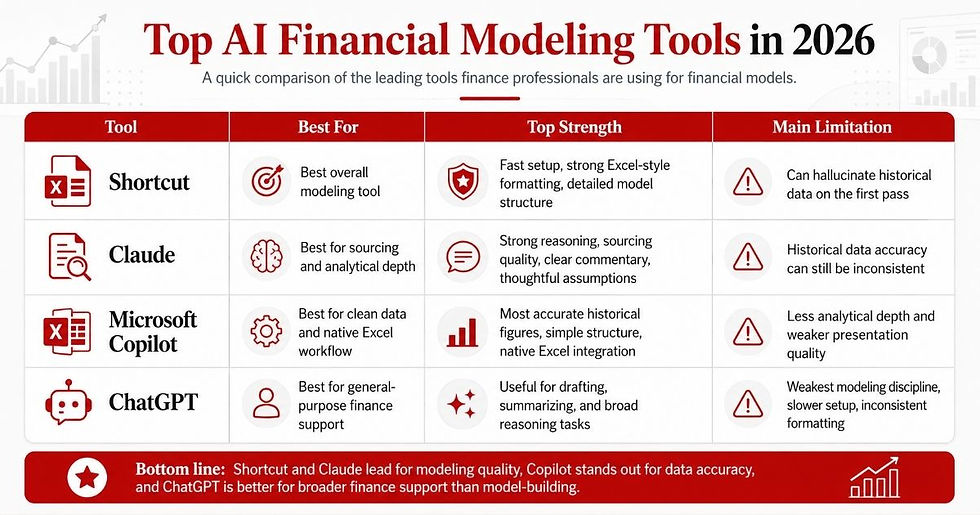
1. Shortcut — Best Overall AI Tool for Building Financial Models
Shortcut, developed by Fundamental Research Labs (v7.4 tested), is an Excel add-in purpose-built for financial analysis. It outperforms every other tool on formatting consistency, speed, and model structure.
Fastest setup time alongside Claude (~15 minutes).
Most investment-bank-like formatting output.
Went into footnotes to surface granular line-item detail.
Product-level revenue segmentation in forecasts.
It’s one notable weakness: hallucinated historical data on the first pass. The errors were subtle, slightly off-line items that still rolled up to correct subtotals, exactly the kind of mistake that can survive an audit if reviewers aren't careful. On a second run, accuracy improved materially. Still, no analyst should rely on AI-scraped data without independent verification.
2. Claude (Anthropic) — Best for Sourcing, Commentary, and Analytical Depth
Claude (Opus 4.6 tested) finished a close second overall and won outright in sourcing quality. It was the only tool to correctly back-solve EBITDA and provided clear, well-reasoned explanations for every modeling decision, behavior that closely resembles what you want from a thoughtful junior analyst.
Best-in-class sourcing and comment quality.
Tied with Shortcut on understanding the assignment and income statement forecasting.
Explicitly designed around investment banking workflows.
Backed by Anthropic's significant R&D investment.
Claude also struggled with historical data accuracy, sometimes hardcoding values that should flow through formulas. But its analytical judgment (how it frames assumptions, how it organizes supporting schedules) sets it apart from both Copilot and ChatGPT.
3. Microsoft Copilot (Agent Mode) — Most Accurate Data, Least Analytical Depth
Copilot (GPT-5 tested) benefits from native Excel integration, which removes the friction that third-party add-ins face. It ranked first in historical data accuracy, which is a meaningful advantage, and produced the simplest model structure and made errors easier to spot.
Most accurate historical figures across the test.
Best flowthrough of assumptions due to simpler model architecture.
Native Excel integration (no add-in required).
The tradeoff is analytical ambition. Copilot chose the path of least resistance: simpler structure, no IB formatting conventions, no comments. It felt more like a capable order-taker than an analytical partner. Finance teams that need speed and clean data pull will find it useful; those who need rigorous, presentation-ready models will not.
4. ChatGPT — Broadest Platform, Weakest Modeling Discipline
ChatGPT (GPT-5.2 tested) remains the dominant general-purpose Large language Model (LLM). But, in a structured financial modeling context, that breadth works against it. Setup took nearly an hour, far slower than its competitors. Output formatting was chaotic by IB standards, and it made the most structural errors of any tool tested.
Produces importable Excel files, though not natively inside Excel.
The balance sheet was the easiest to audit.
Weakest on formatting and modeling best practices.
ChatGPT's scale and general reasoning make it useful for many finance-adjacent tasks like drafting memos, summarizing filings, and explaining concepts. For purpose-built financial model automation, it isn't the right tool.
How AI Improves Financial Modeling and Where It Still Falls Short
This produced a clear picture of where AI-generated financial forecasts add value and where they introduce risk.
Where AI Tools Genuinely Help Finance Teams
Model Scaffolding – Getting from zero to a structurally sound starting point in minutes rather than hours.
Clarifying Questions – Top tools (Shortcut, Claude) proactively surfaced assumptions around revenue segmentation, forecast methodology, and layout. This behavior mirrors that of a competent analyst.
Documentation – Claude, in particular, generated clear explanations of data sources and modeling decisions that would typically take analysts significant time to write.
Where AI-Driven Forecasting Accuracy Breaks Down
Data Accuracy – Every tool hallucinated or misrepresented historical figures to some degree. Errors were subtle enough to pass a surface review but wrong enough to corrupt downstream outputs.
Formula Integrity – Several tools hardcode values instead of linking cells, a fundamental modeling error that breaks scalable finance models as assumptions change.
Circularity Handling – None of the tools correctly modeled the interest income/expense circularity that proper three-statement integration requires.
Debt Schedules – All tools relied on plugs rather than properly integrated debt mechanics.
The overarching risk is that these tools are good at appearing complete. A model that looks right but contains subtle errors buried in supporting schedules is more dangerous than a blank spreadsheet. Analysts who trust AI output without careful review will spend more time correcting mistakes than they saved by using the tool.
The Right Approach to Automate Financial Models with AI
The teams getting real value from AI financial modeling tools aren't replacing their analysts, they're redeploying them. The right workflow treats AI as an accelerant for model initialization and documentation, not as an autonomous modeling agent.
Upload your own source documents. Rather than letting AI scrape the web for financial data, feed it clean PDFs of 10-Ks and press releases. Accuracy improves significantly when the tool works from provided inputs rather than internet searches.
Use AI to reach 60%, not 100%. AI tools reliably get a model to a usable starting structure. The last 40% (circularity, debt mechanics, formula auditing) still requires a human analyst.
Cell-by-cell auditing is non-negotiable. Errors in AI-generated models tend to hide in exactly the places that feel like they don't need checking, subtotals that balance despite incorrect line items beneath them.
Treat each tool run as a first draft. Even the best tools in this category (Shortcut and Claude) produced materially better output on second attempts. Build a review-and-prompt cycle into your workflow.
Which AI Tool Is Best for Financial Analysis? The Bottom Line
For finance professionals who need to build production-quality financial models, here's the current ranking:
Shortcut — Best overall for Excel-native modeling with IB-standard output.
Claude — Best for analytical depth, sourcing quality, and documentation.
Microsoft Copilot — Best for data accuracy and seamless Excel integration.
ChatGPT — Most versatile general-purpose tool, weakest for structured financial modeling.
It's also worth noting that Endex, backed by the OpenAI Startup Fund, is an emerging specialist tool that wasn't available when this content was written, but warrants attention in the near future.
None of these tools outperform even a lower-tier human analyst on a comprehensive modeling task. But used correctly, Shortcut and Claude in particular can meaningfully compress the time a skilled analyst spends on model initialization, freeing capacity for the higher-judgment work that AI tools still can't replicate.
The right question for finance leaders isn't 'should we use AI?' It's 'how do we build a workflow that captures AI's upside without exposing the organization to its still-significant downside?' For now, that means keeping analysts firmly in the loop and holding AI tools to the same standard you'd apply to any new hire.


